Wednesday, February 6, 2019

Speech Extention

A quick review of a free Text to Speech (TTS) extension that could be used as quick AAC for your chrome browser. 

Features:

  • Text to speech
  • built in notebook (no need to keep an open doc)
  • natural voices
  • easy controls


Thursday, December 20, 2018

Giving Time to Talk

Conversation goes at a mile a minute. For students who use AAC, entering the stream of conversation is impossible. The average teenager takes seven conversational turns per minute and change topic at the rate of once or twice in a five minute period. The fastest Speech Generating Device (SDG) user may only be able to produce ten words per minute (Howery, 2018).  

Some people think of Stephen Hawkings giving lectures when they think of SGD users. It can be disappointing when an SDG device does not improve the student's communication in class. 

At best, an SGD is 15-25x slower than regular speech (Beukelman & Mirenda, 2013).

In a recent article, Out of Time: The Experience of Speech-Generating Device Users (2018), Howery interviews AAC users and explores what it's like to use AAC every day. Howery gives a few suggestions and hope.

1. Ask your AAC user to come to class with the answer prepared. Call on the student early in the lecure, to deliver the answer and drive the discussion. This goes for conversation as well. Peers can quickly say "Hello," and, "When I see you tomorrow, I want to hear about your weekend."
2. Remove time from communication: encourage messaging and texting with classmates and friends, which allows asynchronous communication.
3. Use online environments for classroom discussion to allow for better reflection and thought in a public forum for all students.


Beukelman, D., & Mirenda, P. (2013). AAC: Supporting children
and adults with CCN (4th ed.). Baltimore, MD: Paul H. Brookes.

Howery, K. (2018). Out of Time: The Experience of Speech-Generating Device Users. Communication Disorders Quarterly 2018, Vol. 40(1) 40–49.


DIY Eye Gaze Frame

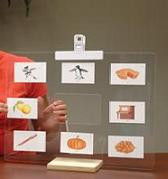
A low-tech option for eye-gaze can be achieved with some PVC pipes and free images from -website-


1)  Check out this step-by-step video from Lydia

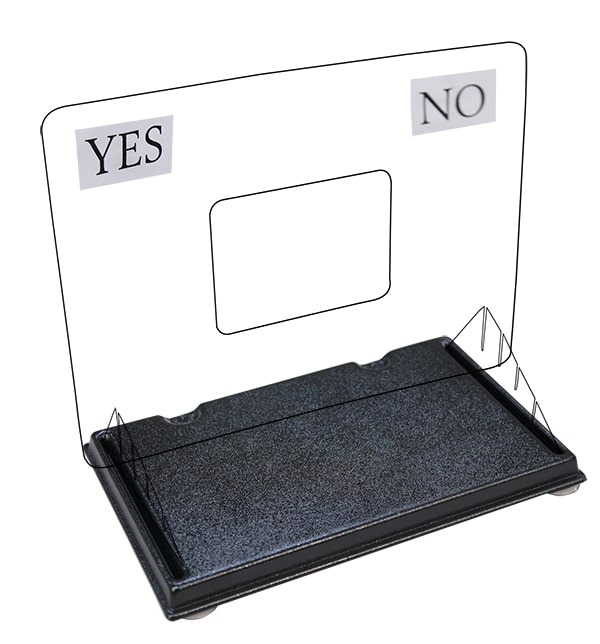
If you prefer not to DIY, here is one you can purchase 
choose "Eye Talk Only" if you don't need the black tray. The tray gives it some stability.
enablingdevices.com
Enabling Devices provides of a range of assistive technology and adapted products for people with disabilities, their teachers and therapists.
If you like Modular Hose as much as me, see this plexiglass shield, it works for eye gaze on a wheel chair for about $55. Available with several different clamp options.
www.modularhose.com
Master Distributors of Loc-Line Modular Hose. Loc-Line is available in 4 different sizes.
www.modularhose.com
ModularHose Mini Clamp This mini clamp is idea for tight spaces or when a smaller clamp will do. Works on round and flat surfaces up to 2 inches.
http://www.modularhose.com/Loc-Line-34-System/34-miscellaneous/514113.html
Shield Kit,  7' x 10"


http://www.acciinc.com/eye-com-board/

Perspex E-Tran I called Jim Rogers at Cadan AT to purchase the E-Tran (below) 


Sunday, March 4, 2018

Staff Use Strategies of Aided Language Input, Multi-Modal Supports and Universal Design for Learning to Increase Student Engagement and Communication in an IBI Program


WELCOME TO THE VALA PROGRAM!!


The Vista Adolescent Learning Academy (VALA) is an intensive behavior intervention (IBI) program for secondary students located in Vista Unified School District that provides services individualized to meet the unique needs of each student with a focus on behavior, communication, functional academic, and adaptive living skills.

Mark Formanns leads a team of incredibly dedicated and passionate individuals that use fundamental principles of modeling language and creating access to curriculum using multiple modalities of support including: partners all model language and symbolic communication, visual time and schedules posted, clear behavior expectations and self-regulation options are always available, and interactive use of technology smartboard. Check out some of the fantastic tools, tips, and strategies used in the classroom:


Many of the students in the VALA program are non-verbal and require the use of augmentative alternative communication (AAC). Mark and staff in the program have received training in and regularly use Aided Language Stimulation techniques and highly motivating activities to successfully engage and teach symbol communication to their students. Check out the crew in action:


KEEP UP THE AMAZING WORK YOU ARE ALL DOING!!


Thursday, October 19, 2017

Making your iPad a Dedicated Communication Device

Making your iPad a Dedicated Communication Device, again... with iOs settings!

You may have noticed in the last update that even in Guided Access (AKA Kid Mode) your student may swipe up or across and access new menus on their iPad! *Update the iPad and Guided Access will now restrict the menus. Apple listened and fixed the problem.

You can use Apple Configurator 2 (free on Mac) to lock the iPad into one app (Single-app Mode). The benefit is that the student can't lock the iPad in Guided Access trying to guess the code. Furthermore, if the device is completely drained of battery, it will remain in single-app mode when it is charged.

Cheers!
Lydia

Sunday, August 27, 2017

Struggle with How to Model Core Vocabulary During Whole Group Activities? Check This Out!!

Do you ever find yourself thinking any of the following:
  • How can I possibly model symbol communication and core vocabulary during a whole group?
  • I don't have time to program or create a symbol board each week for my 1 or 2 students with limited verbal communication.
  • What vocabulary words do I target?  There are so many!
All of these are valid, real world challenges. Whenever we find a colleague, teacher, or therapist who has cleverly faced and overcome some of these challenges, we are quick to pass these strategies on to others in the field. Why re-invent the wheel?  

This month we wanted to highlight Haley Harrington's pre-K classroom in Del Mar Union School District. She has creatively come up with ways to model symbol, core-based vocabulary for her students on a daily basis that keep her little ones engaged and participating, despite their complex communication needs. 

Check out this video of Haley using Aided Language Stimulation modeling during whole group instruction:

This video, Haley describes, how she created her own core-based classroom communication board:

Here are Haley and her staff in action pairing Video Self Modeling techniques and Aided Language Modeling of core vocabulary:

Once your core classroom board is made, there's no need for day-to-day or week-to-week prep of materials. Core words can be woven into any theme, activity, lesson, or location. That's the beauty of core words!! Additionally, the student is getting large amounts of repetition of these words across settings, communication partners, and activities. 

The BEST part about Haley's classroom is the student engagement and the FUN everyone is having... including Haley!  Thanks for sharing Haley!!

Tuesday, January 10, 2017

Implementing Eye Gaze using Aided Language Stimulation

Here's a great video demonstration how communication partners use Aided Language Stimulation techniques and core word focus within context to teach eye gaze to a new AAC :


Click on this slideshow for evidence-based researched AAC Implementation strategies and techniques: